git commands

git clean, used to remove untracked files from the working tree. It’s important to be cautious with this command, as it will permanently delete these files.
- To see what files would be removed without actually deleting them, you can run:
git clean -n - To remove untracked files (excluding directories), you can use:
git clean -f - also want to remove untracked directories, you can add the -d option:
git clean -fd
git gc, cleans up unnecessary files and optimizes the local repository. It does not affect the working tree or the current state of the projectgit reflog, shows a list of the recent actions in the repository, including commits, amends, rebases, and more.- git fast forward merge, does not create a new commit.
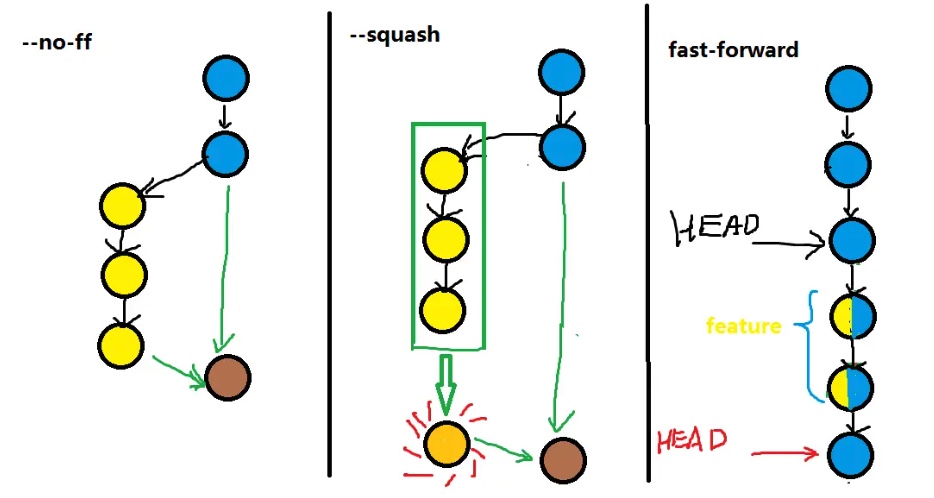
- If you prefer to have a merge commit for record-keeping purposes (such as in certain team workflows), you can use the –no-ff option with git merge to force Git to create a new merge commit even when it could perform a fast-forward merge.
- Reference: https://segmentfault.com/q/1010000002477106
git push -f (Force Push), forcefully updates the remote branch with the current state of your local branch. This can be dangerous, as it rewrites the history on the remote.
- The command would look something like this:
git push -f origin branch_name.
6git remote remove, used to remove a remote reference from your local Git configuration. It does not affect the commits or the remote repository itself.